Keep bookmarks and files close
Save useful messages and share reference material with the people working on your project.
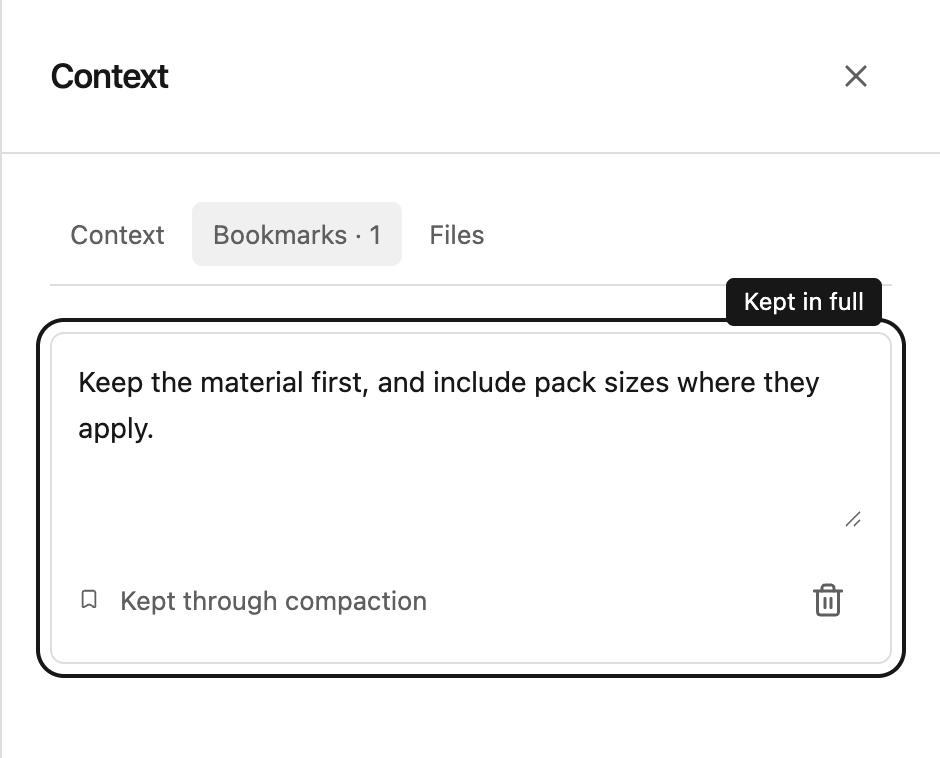
Bookmark an important message
Use the bookmark icon beneath a message to keep its full text in the chat’s persistent context. A bookmark is useful for a decision, a procedure, or a detailed answer you want Steward to remember.
Open Context → Bookmarks to review saved messages. Contributors and managers can edit the saved text or remove a bookmark. Editing a bookmark changes the saved context; it does not edit the original conversation message.
Bookmarked messages remain available in full when the conversation is compacted.
Attach a file to your question
Select the paperclip in the message composer, choose your file, and wait for the upload to finish. Include a question that explains what you want Steward to do with it. You can also paste images or drag files onto the chat, and very long pasted text is attached automatically; see paste long text and drop files.
For example: “Compare the product codes in this spreadsheet with our catalog and show any missing items.”
An attachment in an unfinished draft is private to you. Sending the message shares its attachments with the project. If an upload is interrupted, use Retry file upload before sending.
Add shared reference files
Open Project actions → Configure → Files to add files for the project. You can also find shared attachments in Context → Files within a chat. Project members can access shared files; contributors and managers can add or remove them.
Give files descriptive names so colleagues can recognize the right version. A name such as “Price list — September” is easier to use than “final-v3”.
Read and download results
Steward can use supported uploaded documents, including PDFs, as context. Generated files appear as download cards in the answer. Creating downloadable PDFs is not currently supported.
Select the file name to download it. If a file is unavailable, ask whether it was removed or your access changed. Removing a bookmark or file does not erase text already shared in the conversation.