Review changes in the audit log
See who changed people, access, connections, approvals and automation in your workspace, and export the history.
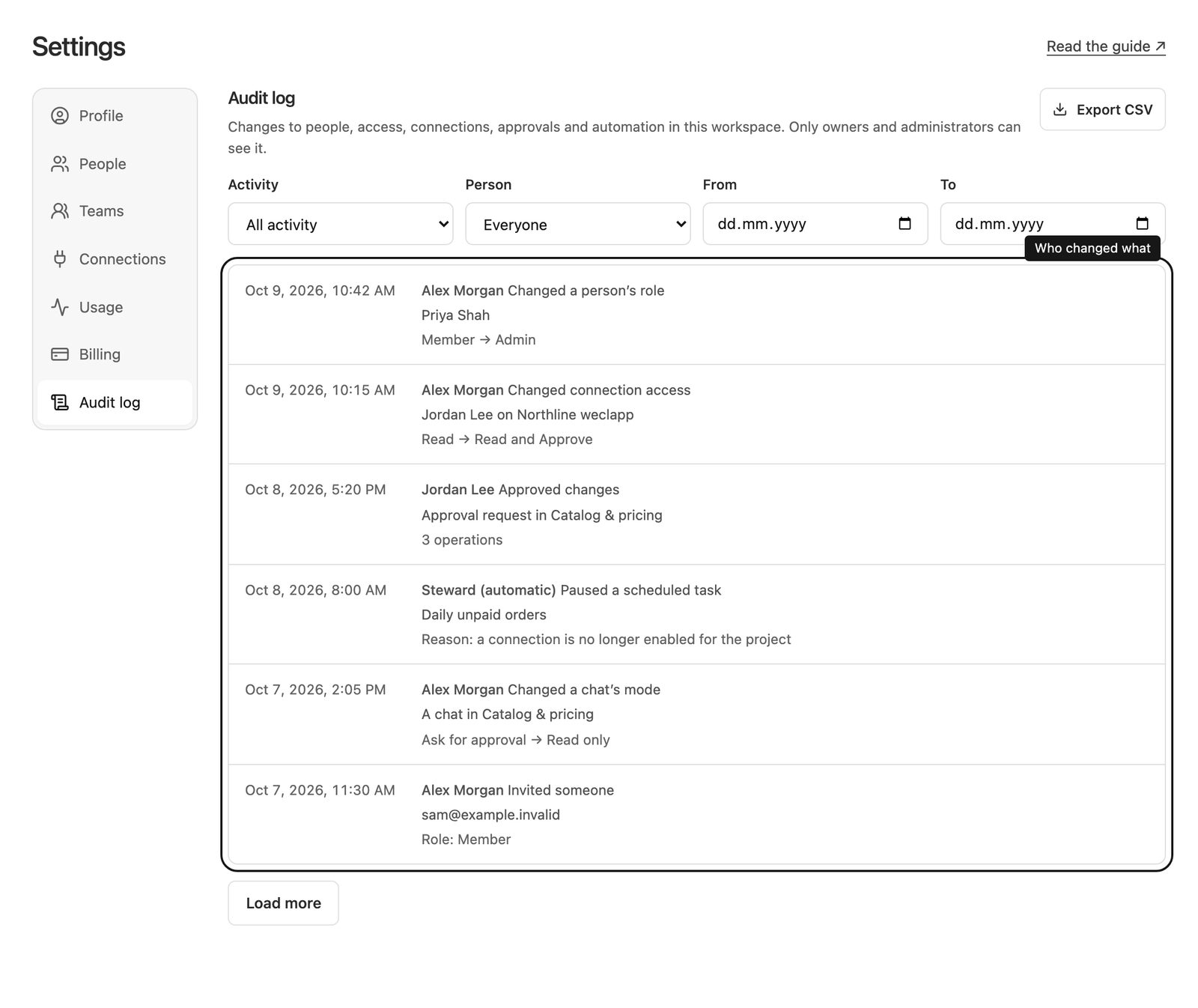
Open the audit log
Workspace owners and administrators can open Settings → Audit log. Other members don’t see this section.
Each entry shows when the change happened (in your own time zone), who made it, what they did, what it affected, and a short summary of what changed, for example Member → Admin. Changes made by Steward itself, such as a scheduled task that was paused automatically, appear as Steward (automatic). The newest changes are at the top; select Load more to see older ones.
What is recorded
The audit log records changes that affect who can do what in your workspace:
- People: role changes, removals, and invitations sent, revoked or accepted.
- Teams: created, renamed, deleted, and changes to their members.
- Projects: created, archived, restored, renamed, instructions changed, project access given, changed or removed, and connections enabled or disabled for a project.
- Connections: added, settings updated, credentials replaced, access given, changed or removed, and changes to which actions always need approval.
- Approvals: changes approved or rejected, and confirmations of uncertain results.
- Chats: a chat’s mode changed, or a chat started in Read only or Automatic mode; chats archived, restored or deleted.
- Scheduled tasks: created, changed (including their mode), paused, resumed and deleted.
- Shared links created or turned off, and changes to image generation limits.
Saving something without changing it doesn’t add an entry.
What is not recorded
The audit log describes changes, not the work itself. It never contains passwords, API tokens or other connection credentials, the content of messages, comments, project instructions or task instructions, or the data sent to your business systems. For instructions it only notes that they changed; for approvals it lists the kinds of operations, not their values.
It also doesn’t record sign-ins, reading or downloading, sending messages, bookmarks, drafts, file uploads, connection tests, or changes that Steward approves automatically in Automatic mode. Use the chat and its approval cards to review that work.
Filter and export
Use Activity, Person, From and To to narrow the list. Dates are whole days in your time zone. Select Clear filters to see everything again.
Select Export CSV to download the entries that match the current filters as a spreadsheet file. An export contains at most 10,000 entries; narrow the dates to export older periods. Values that a spreadsheet could treat as a formula are exported as plain text.
Who can see it and how long it is kept
Only workspace owners and administrators can view or export the audit log. If someone’s role changes to member, they lose access immediately. Each workspace only sees its own history.
Entries are kept for as long as the workspace exists and can’t be edited or deleted, including by administrators. Entries keep the name a person had when they made the change, even if they later leave the workspace.
See roles and access for what each role can do.