Understand ASA method access
Separate Steward capabilities from ASA account permissions, modules, and observed method access.
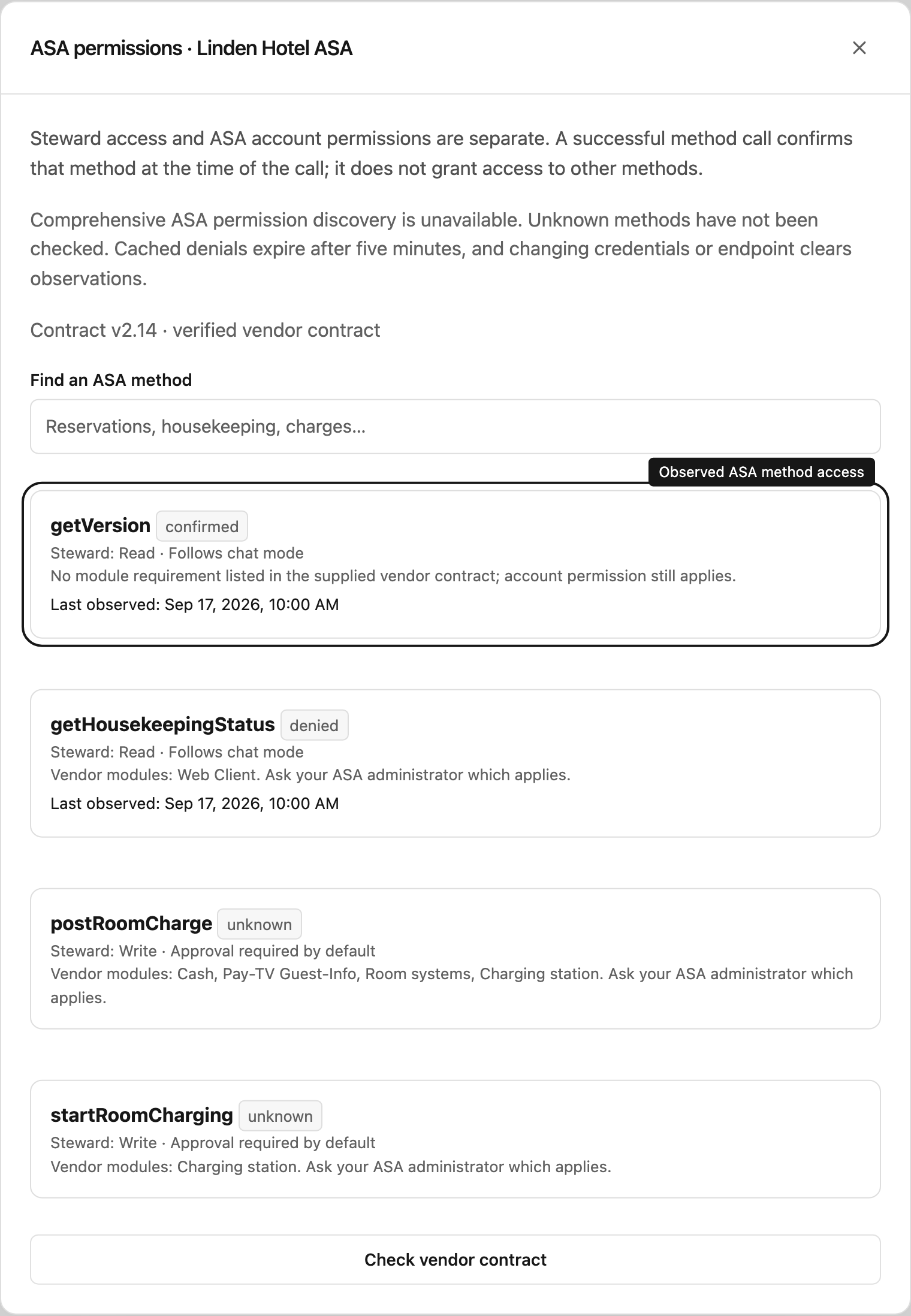
Two permission systems
Steward uses the project role and chat mode to authorize ASA work. ASA separately checks the saved account’s method permissions and licensed modules. SOAP reads work in Read only mode even though they use POST. The observed-access panel is advisory and never grants access.
The chat mode controls execution, while your project role controls what you can do. Read only prevents business-tool changes. Ask for approval requires a Manager’s decision. Automatic permits supported changes for Contributors and Managers unless an approval rule requires review. Choosing a mode never changes project access.
Read the access panel
Under Settings → Connections, select ASA permissions:
- Unknown: this method has not been confirmed for the current credentials.
- Confirmed: a successful call was observed with the current credentials. Permissions may later change in ASA.
- Denied: ASA explicitly rejected this method. Steward caches this observation for five minutes to avoid repeated failures.
The vendor bundle provides no comprehensive permission introspection endpoint. Available WSDL methods and a successful getVersion call do not prove access to other methods. Steward never probes writes to discover permissions.
Module names come from the vendor’s method table. Generally one listed module is sufficient; Beauty additionally requires Data Exchange. Extended Reservation-Service also needs the ASA user configured appropriately. getGuests and getReservations may provide limited functionality without Data Exchange or Cash. Ask the hotel’s administrator which arrangement applies.
Defaults for changes
Routine ASA updates follow the chat mode for Contributors and Managers. Charges, charge documents, daily totals, reservation creation, spa booking/status changes, charging start/stop and room messages require approval by default. A project Manager makes that decision.
All 33 methods in the v2.14 vendor contract have an explicit default: 21 reads, three routine updates and nine changes requiring approval. Unknown methods and fields are blocked. Changing account permissions or an approval rule cannot add contract support.
You need Manager access to the proposal’s project to approve or reject changes. Contributors can prepare changes and review the details. Approval rechecks the executor’s current project access and the enabled connection before execution.
Respond to an error
Authentication failures require checking the saved credentials. A method denial identifies the method to discuss with the ASA administrator. Explicit module errors require enabling the relevant module. Local validation errors mean the proposed XML or parameters do not match the pinned contract. Steward policy denials require the appropriate capability, project binding, mode or review.
An uncertain mutation outcome means the request may have reached ASA. Check its result in ASA before another attempt. Never submit the same charge, booking or document again merely because the connection timed out.
Verify an uncertain execution
Open the proposal in its chat and inspect the recorded results. Someone with Approve and Read access, and project contributor access, must check ASA first. Under Check the uncertain result in ASA, choose whether the change was applied, enter the ASA reference and verification evidence, and select Record reconciliation. Repeat for each uncertain batch item.
This records a separate human verification; it does not restart the old request or rewrite the original execution. Fresh changes can then be prepared with the normal approval rules. Until reconciliation is recorded, further ASA mutations on that connection are blocked.
See Check an uncertain ASA result for the verification steps and account-closure limitation.
With Configure access, Check vendor contract downloads read-only service metadata and queues changes for review. It does not enable methods or discover their granted permissions. If the hotel restricts WSDL downloads, ask its administrator for the current vendor bundle.